Our Short List of 3

- Best for: Students and casual users who want a light, complete detachable kit for browsing, notes, and streaming.
- Display: 10.95-inch WUXGA IPS touchscreen, 1920 x 1200 resolution, Corning Gorilla Glass 3
- Processor: MediaTek Kompanio 838 with AI-enabling NPU
- Memory: 4GB RAM
- Storage: 128GB

- Best for: Travellers and commuters who want the lightest Windows tablet with a tough Gorilla Glass screen.
- Display: 10.5-inch PixelSense touchscreen, 1920 x 1280 resolution, Corning Gorilla Glass 3
- Processor: Intel Processor N200, quad-core, up to 3.7 GHz
- Memory: 8GB LPDDR5 RAM
- Storage: 128GB SSD
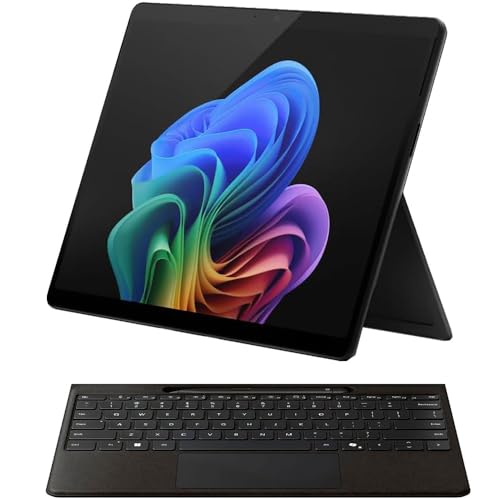
- Best for: Professionals who want a premium tablet that fully replaces a laptop, with an OLED screen and a keyboard in the box.
- Display: 13-inch PixelSense Flow OLED touchscreen, 2880 x 1920 resolution, Corning Gorilla Glass 5
- Processor: Snapdragon X Elite, 12-core, with NPU
- Memory: 16GB RAM
- Storage: 1TB SSD
All 4 Picks at a Glance
| Product | Specs | Action |
|---|---|---|
| Lenovo Chromebook Duet Gen 9 11″ |
| Check price on Amazon |
| Microsoft Surface Go 4 |
| Check price on Amazon |
| Microsoft Surface Pro 11 |
| Check price on Amazon |
 ASUS ROG Flow Z13 (2025) |
| Check price on Amazon |
Key takeaways
- Looking for the best new convertible tablets with Gorilla Glass? Compare four detachable 2-in-1 tablets with tough screens, keyboards, and battery life.
A convertible tablet asks one thing of its screen that a plain tablet never does: it has to survive being carried, propped, detached, and reattached all day. The glass takes the knocks, which is why Corning Gorilla Glass matters more here than on a device that sits on a desk. A detachable keyboard, a kickstand, and a pen all add convenience, but none of them help if the display scratches the first time the tablet slides into a bag beside a charger and keys.
The real choice is between a light ChromeOS detachable for everyday browsing and schoolwork, a compact Windows tablet for travel, a full laptop replacement with an OLED screen, and a gaming-grade detachable that doubles as a workstation. This article is for students, commuters, and home workers who want one device for tablet and laptop use. The four tablets below were chosen from the names and specifications shown on their Amazon product pages, and every one pairs a detachable keyboard with a Gorilla Glass touchscreen.
Quick Picks
As an Amazon Associate we earn from qualifying purchases
| Product | Best for | Key spec from title |
|---|---|---|
| Lenovo Chromebook Duet Gen 9 11″ | Students who want a light ChromeOS detachable with keyboard included | 10.95″ WUXGA touchscreen, MediaTek Kompanio 838, 4GB RAM, 128GB storage |
| Microsoft Surface Go 4 | Travellers who need the smallest full Windows tablet | 10.5″ touchscreen, Intel Processor N200, 8GB RAM, 128GB storage, Windows 11 Pro |
| Microsoft Surface Pro 11 | Professionals replacing a laptop with a tablet | 13″ OLED touchscreen, Snapdragon X Elite, 16GB RAM, 1TB storage, with Surface Pro Keyboard |
| ASUS ROG Flow Z13 (2025) | Gamers and creators who want desktop-class power in tablet form | 13.4″ 2.5K 180Hz touchscreen, AMD Ryzen AI MAX+ 395, 32GB RAM, 1TB SSD |
How to Choose
Match the glass to how the tablet travels
Gorilla Glass is not one single material, and the generation tells you how much abuse the screen is built to take. Gorilla Glass 3 is the workhorse of compact tablets such as the Surface Go 4 and the Chromebook Duet, resisting everyday scratches from bags, desks, and styluses. Gorilla Glass 5 on the Surface Pro 11 adds stronger drop protection for a larger slate carried between rooms and meetings. Gorilla Glass Victus on the ROG Flow Z13 is the toughest of the four and suits a device that is constantly docked, undocked, and moved around. In a padded sleeve the generation rarely matters, but in a crowded backpack alongside chargers and notebooks, the newer glass earns its place.
Pick the operating system before the hardware
The operating system decides what the tablet can actually run, and no amount of memory fixes a mismatch. ChromeOS on the Lenovo Duet is ideal for browser work, classroom apps, streaming, and documents stored in the cloud, and it boots quickly with little maintenance. Windows 11 on the two Surface tablets and the ASUS runs full desktop software, from office suites to photo editors, which matters for anyone who edits files locally or uses specialist programs. A tablet that cannot run the one program your work depends on is the wrong tablet, whatever its screen is made of, so weigh the software you already own before comparing processors.
Check what the keyboard really includes
Detachable does not always mean included, and this is where buyers get caught out. The Lenovo Duet ships with its folio keyboard and kickstand in the box, so it works as a laptop from the first day. The Surface Pro 11 bundle in this article includes the Surface Pro Keyboard, while the Surface Go 4 needs its Type Cover bought separately, which changes the real cost and the day-one experience. Beyond inclusion, check the keyboard itself: a full-size layout with a trackpad suits long typing sessions, while a slim folio keyboard is fine for notes and email but tiring for a full working day.
Balance memory, storage, and screen size together
These three specifications pull in different directions, and the right balance depends on the job. Four gigabytes of memory on the Duet is enough for ChromeOS tabs and streaming, but eight on the Surface Go 4 gives Windows more room to breathe, and sixteen on the Surface Pro 11 or thirty-two on the Flow Z13 supports heavy multitasking and creative work. Storage follows the same logic: 128GB suits cloud-first users, while 1TB on the Surface Pro 11 and the Flow Z13 holds large games, video projects, and offline files. A buyer who picks a large screen with small storage, or a fast processor with too little memory, ends up fighting the weakest part of the machine every day.
The 4 Best Options
Lenovo Chromebook Duet Gen 9 11″
- Best for: Students and casual users who want a light, complete detachable kit for browsing, notes, and streaming.
- Display: 10.95-inch WUXGA IPS touchscreen, 1920 x 1200 resolution, Corning Gorilla Glass 3
- Processor: MediaTek Kompanio 838 with AI-enabling NPU
- Memory: 4GB RAM
- Storage: 128GB
Students and casual users who want a light, complete detachable kit for browsing, notes, and streaming.
The 4GB of memory limits heavy multitasking, so confirm the listing configuration before ordering, since other memory options exist.
The Lenovo Chromebook Duet Gen 9 is the easiest starting point in this group, because it arrives as a complete kit rather than a tablet waiting for accessories. The aluminium body is built to MIL-STD-810H durability standards, the folio stand props the screen at several angles, and the detachable keyboard connects through pogo pins, so the switch from tablet to laptop takes seconds. Its 10.95-inch WUXGA touchscreen is protected by Corning Gorilla Glass 3, and the 400-nit panel stays readable in bright rooms. With up to 12 hours of battery life quoted on the listing, it covers a school day or a long commute without hunting for a socket.
Watch out for: The 4GB of memory limits heavy multitasking, so confirm the listing configuration before ordering, since other memory options exist.
Microsoft Surface Go 4
- Best for: Travellers and commuters who want the lightest Windows tablet with a tough Gorilla Glass screen.
- Display: 10.5-inch PixelSense touchscreen, 1920 x 1280 resolution, Corning Gorilla Glass 3
- Processor: Intel Processor N200, quad-core, up to 3.7 GHz
- Memory: 8GB LPDDR5 RAM
- Storage: 128GB SSD
Travellers and commuters who want the lightest Windows tablet with a tough Gorilla Glass screen.
The Type Cover keyboard and Surface Pen are sold separately, so budget for them if laptop-style typing matters.
The Microsoft Surface Go 4 is the smallest full Windows tablet here, and that is its whole appeal. At 521 grams it disappears into a bag, yet it runs Windows 11 Pro and the desktop programs that ChromeOS cannot. The 10.5-inch PixelSense touchscreen is protected by Corning Gorilla Glass 3, and the built-in kickstand lets the slate stand on a train table or a kitchen counter without a case. An Intel Processor N200 handles office documents, video calls, and browsing, while 8GB of memory and 128GB of storage keep the system responsive for everyday work. Microsoft quotes up to 12.5 hours of battery life.
Watch out for: The Type Cover keyboard and Surface Pen are sold separately, so budget for them if laptop-style typing matters.
Microsoft Surface Pro 11
- Best for: Professionals who want a premium tablet that fully replaces a laptop, with an OLED screen and a keyboard in the box.
- Display: 13-inch PixelSense Flow OLED touchscreen, 2880 x 1920 resolution, Corning Gorilla Glass 5
- Processor: Snapdragon X Elite, 12-core, with NPU
- Memory: 16GB RAM
- Storage: 1TB SSD
Professionals who want a premium tablet that fully replaces a laptop, with an OLED screen and a keyboard in the box.
Some older Windows programs built for other processor types may need their ARM-compatible versions, so check the software you rely on before switching.
The Microsoft Surface Pro 11 is the laptop replacement of the group, and its screen is the reason buyers choose it over a conventional notebook. The 13-inch PixelSense Flow OLED touchscreen runs at 2880 x 1920, shows deep blacks and vivid colour, and is protected by Corning Gorilla Glass 5 with an anti-reflective coating. A 12-core Snapdragon X Elite processor with a dedicated NPU powers Copilot+ PC features, while 16GB of memory and a 1TB SSD leave room for large projects and offline files. This bundle includes the Surface Pro Keyboard, so the tablet works as a laptop straight out of the box.
Watch out for: Some older Windows programs built for other processor types may need their ARM-compatible versions, so check the software you rely on before switching.
ASUS ROG Flow Z13 (2025)
- Best for: Gamers and creators who want maximum power in a detachable tablet with the toughest screen glass here.
- Display: 13.4-inch 2.5K touchscreen, 2560 x 1600 resolution, 180Hz refresh rate, Corning Gorilla Glass Victus
- Processor: AMD Ryzen AI MAX+ 395, 16 Zen 5 cores
- Graphics: AMD Radeon integrated graphics
- Memory: 32GB LPDDR5X memory
Gamers and creators who want maximum power in a detachable tablet with the toughest screen glass here.
The high-performance hardware draws more power under load than the lighter tablets, so check battery expectations against your own daily use.
The ASUS ROG Flow Z13 is the most powerful convertible tablet in this article, and it makes no apology for it. Beneath the 13.4-inch touchscreen sits an AMD Ryzen AI MAX+ 395 processor with 16 Zen 5 cores, Radeon integrated graphics, 32GB of LPDDR5X memory, and a 1TB PCIe Gen 4 SSD, which is a specification sheet closer to a gaming laptop than a tablet. The 2.5K display runs at 2560 x 1600 with a 180Hz refresh rate, a touchscreen, and stylus support, and the screen is protected by Corning Gorilla Glass Victus. The keyboard detaches, and the tablet alone weighs 2.65 lbs.
Watch out for: The high-performance hardware draws more power under load than the lighter tablets, so check battery expectations against your own daily use.
Which One Fits Your Situation
Studying, reading, and light work on a budget
Pick the Lenovo Chromebook Duet Gen 9. The keyboard and kickstand are already in the box, ChromeOS handles classroom apps and documents with no fuss, and the Gorilla Glass 3 screen survives daily life in a school bag. The 4GB model suits browsing and streaming, and the whole kit weighs little enough to carry between classes all day.
Travelling light with full Windows software
Pick the Microsoft Surface Go 4. It is the smallest and lightest device here, yet it runs the full Windows desktop, so office programs and video calls work exactly as they do on a larger machine. The Gorilla Glass 3 screen and built-in kickstand make it a practical travel companion, and the compact size is the deciding factor when bag space is tight.
Replacing a laptop for professional work
Pick the Microsoft Surface Pro 11. The OLED display, Gorilla Glass 5 protection, 16GB of memory, and 1TB of storage cover serious work, while the included keyboard means there is nothing extra to buy before the first working day. The Snapdragon X Elite chip and Copilot+ PC features suit professionals who want a fast, quiet, all-day machine.
Gaming and creative work in tablet form
Pick the ASUS ROG Flow Z13. Nothing else here matches its processor, memory, or 180Hz display, and Gorilla Glass Victus gives the screen the strongest protection of the four. The detachable keyboard turns it into a gaming laptop at a desk and a tablet on the sofa, which is exactly the flexibility its buyers are paying for.
Common Mistakes
- Buying a detachable tablet without checking whether the keyboard is included, then discovering the Type Cover or keyboard is a separate purchase.
- Choosing a screen size from a photo instead of thinking about bag space, desk space, and how much of a document needs to be visible at once.
- Picking the cheapest memory configuration and then running out of room when browser tabs, video calls, and office programs pile up together.
- Assuming every Gorilla Glass screen offers the same protection, when the generation, from Gorilla Glass 3 to Victus, changes how much scratch and drop resistance you actually get.
- Ignoring the operating system and ending up with a tablet that cannot run the one desktop program, classroom app, or game the buyer needs most.
Frequently Asked Questions
Is Gorilla Glass enough to use a convertible tablet without a case?
Gorilla Glass protects against scratches and everyday knocks, and the newer generations add meaningful drop resistance, but it is not unbreakable. A slim sleeve or a folio cover still helps when the tablet shares a bag with chargers, keys, and notebooks, and a screen protector adds a cheap layer of insurance for the glass underneath.
Do all four of these tablets come with a keyboard?
No, and this is the detail to check on each listing. The Lenovo Duet and the ROG Flow Z13 include their keyboards, and the Surface Pro 11 bundle in this article includes the Surface Pro Keyboard. The Surface Go 4 needs its Type Cover bought separately, so confirm the exact bundle on the listing before ordering.
Can a convertible tablet really replace a laptop?
It can when the operating system and the hardware match the work. The Surface Pro 11 and the ROG Flow Z13 run full desktop software with laptop-grade processors and memory, so they replace a notebook for most buyers. The Surface Go 4 suits lighter office work, and the Chromebook Duet suits cloud-based work.
Which Gorilla Glass generation should I look for?
Gorilla Glass 3 covers everyday scratches and suits light, budget tablets that travel in a sleeve. Gorilla Glass 5 adds stronger drop protection for larger slates that get carried often. Gorilla Glass Victus is the toughest option here and suits a tablet that is constantly detached, reattached, and moved around.