
Key takeaways
- Compare the best under desk cable management kits for small apartments, including clamp-on trays, adhesive raceways, and renter-friendly no-drill picks.
- Top Pick: Yecaye 2-Pack Cable Management Under Desk, 31.5 Inch
- Runner-up: EVEO Cable Management 96-Inch J Channel, 6 Pack
- Also consider: KEEGH 16-Inch Under Desk Cable Management Tray
The best under desk cable management kits for a small apartment are the Yecaye 2-pack adhesive trays for a renter-friendly budget fix, the KEEGH 16-inch clamp-on metal tray when you want a sturdier hold without drilling, and the AEONS adjustable tray kit for long desks that need coverage from 23 to 41 inches. Apartment desks usually sit in a corner of a living room or bedroom, so the power strip, monitor cables, laptop charger, and lamp cord all end up in one visible tangle that also collects dust on the floor. An under desk kit lifts that bundle off the ground, hides the power strip inside a tray or channel, and leaves the floor clear for vacuuming and for your feet. The five kits below cover the three mounting styles that matter in rented spaces: adhesive trays that peel away, clamp-on trays that grip the desk edge, and screw-mount trays for desks you own. Measure your desk edge thickness and the length of your power strip before ordering, because those two numbers decide which kit actually fits.
As an Amazon Associate, we earn from qualifying purchases.
Table of Contents
- Yecaye 2-Pack Cable Management Under Desk, 31.5 Inch
- EVEO Cable Management 96-Inch J Channel, 6 Pack
- KEEGH 16-Inch Under Desk Cable Management Tray
- PAVSTINE Under Desk Cable Management Tray, 17 Inch
- AEONS Under Desk Cable Management Tray Kit
- How to Choose an Under Desk Cable Management Kit
- FAQ
- Conclusion
- Product and ASIN Reference
Yecaye 2-Pack Cable Management Under Desk, 31.5 Inch

The Yecaye 2-pack is the budget pick for renters who cannot drill and do not want to clamp anything to a thin desk edge. Instead of one long tray, the kit splits coverage into two 15.7-inch trays that add up to 31.5 inches of total length, so you can run one tray behind a monitor and the second along the side of the desk, or place both end to end under a wider top. Each tray is made of 2-millimeter hard PVC and mounts with strong adhesive tape, so installation is a peel-and-stick job with no tools. The listing asks you to wait at least 24 hours before loading the trays so the adhesive can set, and once set it rates the hold at up to 6 pounds, enough for a standard power strip and a bundle of charging cables. Five cutouts along the sidewall and bottom of each tray let cords drop in or out where you need them, and the trays can face inward or outward. The box also includes four cable holders and six cable ties. Pick it when the desk is small, the budget is tight, and everything has to come off without a trace at the end of a lease.
Specs:
- Two trays, each 15.7 x 3.9 x 3.5 inches, 31.5 inches total coverage
- 2-millimeter hard PVC construction
- Adhesive tape mounting, no screws or drilling
- Rated hold up to 6 pounds once the adhesive has set for 24 hours
- Five routing cutouts along the sidewall and bottom of each tray
- Includes 4 cable holders and 6 cable ties
- Tier: budget
EVEO Cable Management 96-Inch J Channel, 6 Pack

The EVEO kit takes a different approach: instead of a tray that holds a power strip, it gives you six 16-inch J-channel raceways, 96 inches in total, that guide individual cables along the underside of the desk and down its legs. The open J profile means you lay cables in from the top rather than threading them through a closed tube, so adding or removing a cord later does not mean taking the channel down. Each section has a built-in adhesive stripe and sticks to any smooth, clean surface, and the slim profile hides well under shallow apartment desks where a deep tray would knock against your knees. EVEO rates the channels for up to 10 power cords or 16 Cat-5 Ethernet cables, which covers a typical home office bundle. Because the sections are separate, you can split the run: four pieces under the desk, one down a leg, and one spare for a TV stand.
Specs:
- Six J-channel raceway sections, 16 inches each, 96 inches total
- Open J profile for laying cables in without threading
- Self-adhesive mounting with built-in adhesive stripe
- Rated for up to 10 power cords or 16 Cat-5 Ethernet cables
- Sections can be split across desk, legs, and other furniture
- Color: white
- Tier: budget
KEEGH 16-Inch Under Desk Cable Management Tray

The KEEGH tray is the mid-range clamp-on option, built from metal with a matte black finish for people who do not trust adhesive with a heavy power strip. The C-clamps grip the back edge of the desk and use rubber pads at both ends to protect the tabletop from scratches, so it suits rented desks and glass or wood tops you need to hand back undamaged. KEEGH rates each tray at up to 22 pounds of load, the highest figure in this roundup, leaving plenty of headroom for a surge protector, a laptop power brick, and a coil of spare cable. The tray also has pre-drilled screw holes in a triangular pattern if you would rather fix it permanently, and eight ventilation holes along each side help warm adapters shed heat. The listing notes that you need at least 2.36 inches of flat space at the desk edge or underside, so check that before ordering if your desk has a thick frame. Ten cable ties are included.
Specs:
- 16-inch metal tray with matte black finish
- Clamp-on C-clamp mounting with rubber protective pads, no drilling
- Optional screw mounting with three-screw triangular pattern
- Rated load capacity up to 22 pounds
- Eight ventilation holes along each side of the tray
- Requires at least 2.36 inches of flat space at the desk edge
- Includes 10 cable ties
- Tier: mid-range
PAVSTINE Under Desk Cable Management Tray, 17 Inch
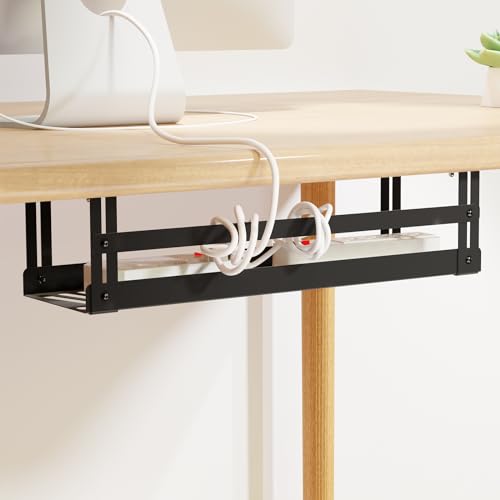
The PAVSTINE tray is a carbon steel basket that ships as a complete hardware kit, a good fit for anyone who wants every bolt and tool in the box rather than a trip to a hardware store. The tray measures 16.92 x 4.95 x 3.93 inches, wide enough for a full-size power strip with bulky adapters side by side, and the open basket design keeps air moving around warm plugs. You get two mounting routes: standard screws, which the brand rates at up to 15 pounds of hold, or adhesive screw mounts for a lighter load of up to 6 pounds when you cannot drill. The kit includes seven bolts, seven nuts, two adhesive screws, five screws, a small wrench, and a screwdriver, so the install is self-contained. Pre-drilled mounting holes keep the spacing consistent, and the steel frame shrugs off knocks that crack thin plastic trays. This is the right pick for a permanent home office corner in an apartment you plan to stay in, where the desk is yours and a screw-mount tray can stay put for years. If you rent and your lease bans screws, use the adhesive mounts and keep the load light, or choose a clamp-on kit instead.Specs:
- Carbon steel basket tray, 16.92 x 4.95 x 3.93 inches
- Screw mounting rated up to 15 pounds
- Adhesive screw mounting rated up to 6 pounds
- Open basket design with pre-drilled mounting holes
- Kit includes 7 bolts, 7 nuts, 2 adhesive screws, 5 screws, wrench, and screwdriver
- Color: black
- Tier: mid-range
AEONS Under Desk Cable Management Tray Kit

The AEONS kit is the premium option, aimed at long desks and standing desks where a fixed 16-inch tray leaves half the cables exposed. Its horizontal tray adjusts from 23 inches up to 41 inches, so one kit covers the full width of most apartment desks and can shrink back down if you move to a smaller top later. Mounting is handled by a removable C-clamp, which means no drilling and an install you can undo in minutes, and the tray is reversible: run it as an open cable raceway, or flip it to act as a modesty panel that hides the cable bundle from the front as well as from below. That dual role matters in open-plan apartments where the back of the desk faces the living area. The metal build and clamp design suit heavier setups with multiple monitors, a desktop PC, and a printer sharing one long run. It also pairs well with a standing desk, as long as you leave enough slack in the drop to the wall outlet. Choose the AEONS when your desk is long and your cable count is high.
Specs:
- Adjustable tray length from 23 inches to 41 inches
- Removable C-clamp mounting, no drilling required
- Reversible design works as a cable raceway or a modesty panel
- Suits long desks, standing desks, and multi-monitor setups
- Model: BX21-DCM-D303B-V
- Color: black
- Tier: premium
How to Choose an Under Desk Cable Management Kit
Start with the mounting style, because it decides whether the kit works in your home at all. Adhesive trays and raceways, like the Yecaye and EVEO kits, are the safest choice for renters and thin desk tops, but they carry the lightest loads and need a smooth, clean surface plus a full day for the tape to set. Clamp-on trays, like the KEEGH and the AEONS, hold far more weight and come off without marks, yet they need a desk edge with enough flat depth for the clamp to grip, so measure the edge and check for frames or lips that block it. Screw-mount trays such as the PAVSTINE hold awkward loads most securely, but they suit only desks you own.
Next, match the size to your gear. Measure your power strip end to end and add room for the largest adapter; a strip with two bulky bricks often needs a tray at least 16 inches long and close to 5 inches wide. A single tray hides the strip and the slack, while J-channel raceways are better when cords also need to travel along the desk and down a leg to the outlet. For standing desks, leave a service loop of slack between the tray and the wall so cables are never pulled tight at full height.
Finally, think about heat and access. Open baskets and ventilated trays keep adapters cooler than closed boxes, and open-top designs let you swap a charger without unmounting anything. If the back of your desk faces the room, a reversible tray with a modesty panel keeps the bundle out of sight from both sides.
FAQ
Can I use an under desk cable tray in a rented apartment?
Yes, as long as you choose a no-drill design. Clamp-on trays grip the desk edge and come off without leaving marks, and adhesive trays and raceways peel away from smooth surfaces when you move out. Screw-mount trays should be reserved for desks you own, since they leave holes in the underside.
How much weight can an under desk cable management tray hold?
It depends on the mounting style. Adhesive trays in this roundup are rated up to about 6 pounds, which suits a power strip and charging cables. Clamp-on metal trays carry much more, with the KEEGH rated up to 22 pounds, and screw mounting sits in between at up to 15 pounds for the PAVSTINE. Load adhesive trays only after the tape has fully set.
What is the difference between a cable tray and a cable raceway?
A tray is an open basket that holds a power strip, adapters, and coiled slack in one place under the desk. A raceway, such as a J channel, is a long channel that guides individual cables along a route, for example under the desk and down a leg. Many setups use both.
Will an under desk kit work with a standing desk?
Yes, and it helps, because the tray keeps the power strip moving with the desktop instead of sitting on the floor. Fit the strip inside the tray, then leave a loose loop of cable between the tray and the wall outlet so nothing pulls tight when the desk is at full standing height. Adjustable trays like the AEONS suit wide standing desks best.
Conclusion
For most apartment desks, the Yecaye 2-pack is the simplest place to start: it sticks on without tools, covers 31.5 inches across two trays, and comes off cleanly when you move. If your cables mainly need guiding rather than a power strip home, the EVEO J-channel kit covers 96 inches for very little money. Step up to the KEEGH clamp-on tray when the load is heavy and the desk edge can take a clamp, or the PAVSTINE steel basket when you own the desk and want a complete screw-mount kit in one box. For long or standing desks, the adjustable AEONS kit covers up to 41 inches and hides cables from the front as a modesty panel. Whichever style you choose, measure the desk edge and the power strip first, and the tangle under your desk can disappear in an afternoon.


