
Key takeaways
- Compare the best TV wall mounts for small apartments, from low-profile fixed brackets to full-motion arms, with VESA, stud, and weight checks explained.
- Top Pick: Mounting Dream MD2380 Full Motion TV Wall Mount
- Runner-up: USX MOUNT Fixed Low Profile TV Wall Mount
- Also consider: ECHOGEAR MaxMotion EGLF2 Full Motion TV Wall Mount
In a small apartment, the floor space under the television is too valuable to give up to a media console. A wall mount reclaims that footprint, lifts the screen to a proper viewing height, and removes the tip-over risk that comes with a stand on a crowded floor. The catch is that apartment walls and apartment leases are less forgiving than a suburban living room, so the right mount depends on three measurements and one honest conversation with your landlord. This guide compares five well-documented mounts, from a fixed low-profile bracket to a premium tilting model, and explains how to match each one to your wall, your studs, and your screen.
As an Amazon Associate, we earn from qualifying purchases.
Quick Answer
For most small apartments, the Mounting Dream MD2380 is the balanced pick: it fits 32 to 65 inch TVs, swings and tilts on dual arms, and works on standard 16 inch stud spacing. Choose the USX MOUNT Fixed Low Profile bracket when the TV just needs to sit flat against the wall, and the SANUS Premium Tilting mount for a large screen that still needs cable access.
Measure First: VESA, Weight, and Studs
Every mount decision starts with the VESA pattern, the square of four screw holes on the back of the television. Measure the horizontal and vertical spacing in millimeters, and the mount you buy must list that exact pattern in its range. A 55 inch TV commonly uses 400 by 400 or 300 by 300, while smaller sets often use 200 by 200 or 100 by 100. Screen size ranges printed on mount boxes are only a rough guide; VESA and weight are the two hard limits.
Weight is the second check. Add the television’s weight from its spec sheet, and keep a sensible margin below the mount’s rated capacity rather than running at the limit. The third check is the wall itself. Full-motion and tilting mounts must anchor into wood studs or solid masonry, never into drywall alone, because the leverage of an extended arm multiplies the load on the fasteners. In most apartments the studs sit 16 inches apart, so a mount whose wall plate spans 16 inch spacing, or offers both 16 and 24 inch options, gives you far more placement freedom. Renters should also confirm that the lease allows drilled holes at all; if it does not, a stand or a console is the honest answer, and the Who Should Skip section below covers that case.
The Five Mounts, Matched to the Room
Mounting Dream MD2380 Full Motion TV Wall Mount

The MD2380 is the all-rounder of this group. Its dual articulating arms let the screen pull out from the wall, swivel toward a sofa or a kitchen counter, and tilt to cut glare from a window, then fold back when the room needs to feel bigger. For a studio where the same screen serves the bed, the desk, and the couch, that range of movement earns its keep every day.
Specs:
– TV size: 32 to 65 inches
– Weight capacity: up to 99 lbs
– VESA: up to 400 x 400 mm
– Movement: full motion, dual articulating arms, swivel and tilt
– Stud spacing: 16 inch wood studs
– Model: MD2380
USX MOUNT Fixed Low Profile TV Wall Mount

Not every apartment needs a moving screen. If the sofa sits squarely in front of the TV and never moves, a fixed bracket is the simplest and slimmest option. This USX MOUNT bracket holds the television flat and close to the wall, which keeps a narrow room feeling open and removes the temptation for the screen to drift out of level. It is also the easiest style to install, with a one-piece wall plate and a short parts list.
Specs:
– TV size: 26 to 55 inches
– Weight capacity: up to 99 lbs
– VESA: 75 x 75 up to 400 x 400 mm
– Movement: fixed, low profile
– Wall types: wood studs (8, 12, or 16 inch spacing) or concrete
– Model: USX MOUNT Fixed TV Wall Mount
ECHOGEAR MaxMotion EGLF2 Full Motion TV Wall Mount
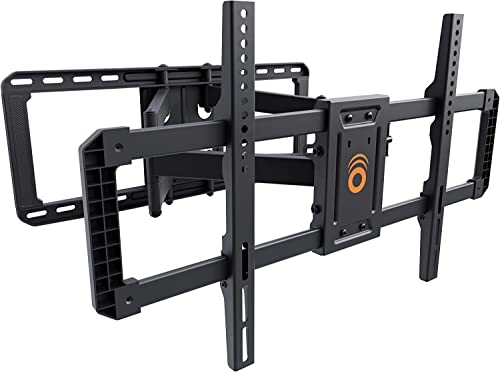
The EGLF2 is the heavy-duty option for a larger screen in a small room. It extends a full 22 inches, which is enough to turn a big TV toward an L-shaped seating layout, yet retracts to a slim 2.4 inch profile so the screen hugs the wall when guests arrive. The box includes a drilling template and a full hardware kit, and the wall plate accepts both 16 and 24 inch stud spacing, a real advantage in older apartment buildings with irregular framing.
Specs:
– TV size: 42 to 90 inches
– Weight capacity: up to 125 lbs
– VESA: 200 x 100 up to 600 x 400 mm
– Extension: up to 22 inches, retracts to 2.4 inches from the wall
– Swivel: 130 degrees; Tilt: up to 15 degrees
– Model: EGLF2
PERLESMITH Corner TV Wall Mount PSCLF1

Corner placement is a classic small-apartment move: it uses the one patch of wall that furniture cannot, and it angles the screen toward the whole room. This PERLESMITH mount is built for exactly that job, with dual articulating arms that reach into a corner and a swivel range that lets you fine-tune the angle after the TV is up. Post-install level adjustment of plus or minus 3 degrees forgives a slightly imperfect drill job.
Specs:
– TV size: 26 to 60 inches
– Weight capacity: up to 99 lbs
– VESA: up to 400 x 400 mm
– Tilt: plus 5 to minus 15 degrees; Swivel: plus or minus 45 degrees
– Level adjustment: plus or minus 3 degrees after installation
– Model: PSCLF1
SANUS Premium Tilting TV Wall Mount

A tilting mount is the middle path: the screen stays close to the wall but angles down over glare or a high mounting position. This SANUS premium model adds a useful trick for apartments, extending up to 5.7 inches from the wall so you can reach cables and ports without unmounting the TV, then settling back for viewing. It is the strongest bracket here, rated for very large screens, and it ships with hardware and a drill template.
Specs:
– TV size: 46 to 90 inches
– Weight capacity: up to 150 lbs
– Movement: tilting, with up to 5.7 inches of extension for cable access
– Fit: universal mounting pattern
– Includes: mounting hardware and drill template
– Model: SANUS Premium Tilting TV Wall Mount
How to Choose
Start with VESA and weight, not screen size. Two televisions with the same diagonal can have different hole patterns and very different weights. Match the pattern exactly and stay comfortably under the rated capacity.
Decide how much movement the room really needs. A fixed bracket suits a single sofa facing the screen. A tilting mount solves glare and high placement. Full motion pays off in studios and open-plan rooms where viewing happens from several seats.
Check your stud spacing before ordering. Measure or scan the wall first. A mount that spans 16 inch studs is the apartment standard; wider plates that also cover 24 inch spacing add flexibility in older buildings.
Think about cable access. Fixed mounts sit so close to the wall that plugging in a new device can mean lifting the TV off the bracket. Tilting and full-motion designs that extend or tilt away from the wall make routine cable changes far easier.
Plan the repair, if you rent. Even a perfect install leaves bolt holes. Keep the removed screws, note the paint color, and expect to fill and touch up the wall when you move out.
Who Should Skip a Wall Mount
Skip mounting if your lease flatly prohibits drilling and your landlord will not make an exception; a low console or a floor stand protects your deposit. Skip it if your walls are plaster over lath, crumbling masonry, or metal studs and you are not prepared to use the specialist anchors those surfaces demand. Skip a full-motion arm if the TV will never move, since you would be paying for mechanics you never use. And skip mounting altogether in a room where the only available wall faces a bright window head-on, because no tilt range fully rescues a washed-out picture.
Frequently Asked Questions
Can I mount a TV on drywall without studs?
No mount in this guide should be anchored to drywall alone. Fixed, tilting, and full-motion brackets all need wood studs or solid masonry, because an extended screen acts as a lever on its fasteners. If your wall has no stud where the TV must go, reposition the mount or use a stand instead.
How do I find my TV’s VESA pattern?
Measure the distance between the four screw holes on the back of the television, horizontally and vertically, in millimeters. Common results are 200 by 200, 300 by 300, and 400 by 400. The figure also appears in the TV’s manual and spec sheet.
Will a wall mount damage my apartment walls?
Mounting leaves bolt holes in the studs and drywall, which most tenants repair with filler and touch-up paint before moving out. Whether that counts as damage depends on your lease, so check the clause on holes and fixtures before drilling.
What size mount do I need for a 55 inch TV?
Ignore the diagonal and match the VESA pattern and weight. A 55 inch set usually pairs with a 400 by 400 pattern, which the MD2380, the USX MOUNT fixed bracket, and the PERLESMITH corner mount all cover, while the EGLF2 and the SANUS tilting mount suit larger or heavier 55 inch models as well.
Final Verdict
The Mounting Dream MD2380 is the safest default for a small apartment: honest capacity, dual-arm movement, and standard stud spacing. The USX MOUNT fixed bracket wins when the screen never needs to move and the wall should stay clean. For a big television, the ECHOGEAR EGLF2 brings the longest reach and the slimmest retracted profile, while the SANUS premium tilting mount is the refined choice for a fixed seating layout with frequent cable changes. The PERLESMITH corner mount solves the layout problem the others cannot. Measure the VESA pattern, weigh the TV, find the studs, and any of these five will turn a crowded corner of the room back into usable space.


