Key takeaways
- Find the best gaming desks for cable management, with built-in trays, grommets and surge protector storage to keep every cable tidy and out of sight now.
A gaming setup collects cables fast. A monitor, a PC, a keyboard, a mouse, a headset charger, speakers, a console, and a phone charger can turn the space behind a desk into a tangled knot within a week of building it. The best gaming desks for cable management solve that problem at the desk itself, with trays, grommets, cutouts, and surge protector storage built into the frame, so cables have somewhere to go instead of piling up on the floor.

The quick answer is that the right desk depends on the size of the setup and the way the cables run. A compact desk with an under-desk wire basket suits a single-monitor setup in a small room. A large L-shaped desk with a full-length tray suits a multi-monitor battlestation with a PC tower, speakers, and a console. A standing desk with a tray that moves with the desktop suits anyone who changes height during the day, because cables routed through a fixed tray can pull tight when the desk rises.
This guide covers five gaming desks that each include a named cable management feature in the product listing, from a budget classic with under-desk wire storage to a dual-motor standing desk with a dedicated tray.
Quick Picks
Our Short List of 3
All 5 Picks at a Glance
| Product | Specs | Action |
|---|---|---|
| Atlantic Original Gaming Desk (B0058O8EN8) | Check price on Amazon | |
| Homall Gaming Desk 44 Inch (B07ZFD97MM) | Check price on Amazon | |
 HUANUO Dual Motor L-Shaped Standing Gaming Desk (B0D2XP4PDS) | Check price on Amazon | |
 SEDETA L Shaped Gaming Desk 96 Inch (B0CFZZCNC3) | Check price on Amazon | |
 EUREKA ERGONOMIC GTG L60 Gaming Desk (B09X3JTW9B) | Check price on Amazon |
How to Choose
Cable Tray Size and Placement
The tray is the heart of cable management on a gaming desk. A shallow basket that only holds a few thin cables will overflow once a power strip, a monitor brick, and a headset charger join it. Look for a tray deep and long enough to hold a surge protector flat, with room for the thickest power bricks in the setup. Placement matters too: a tray mounted at the rear edge keeps cables short and hidden, while a tray set too far forward can press against the knees.
Grommets, Cutouts, and Routing Holes
Grommets and cutouts are the entry points that let cables drop from the desktop into the tray below. One hole in the centre is rarely enough for a gaming setup, because the monitor, keyboard, mouse, speakers, and headset often sit on different sides of the desk. Two or three routing points, spread across the rear of the desktop, give each device a short, direct path down. Wide slots work better than small round holes for thick display cables and power bricks with bulky plugs.
Surge Protector Storage
A surge protector is the bulkiest single item in most cable setups, and it is also the one that causes the most clutter when it sits on the floor. Desks that include a dedicated surge protector tray or a holder sized for a power strip keep it off the floor, within reach, and out of sight. If the desk has no dedicated holder, measure the tray against the surge protector before buying, because a strip that is longer than the tray will stick out at one end and defeat the purpose.
Desk Size and Monitor Capacity
Cable management only works when the desk is wide enough for the gear in the first place. A desk that is too narrow forces monitors to the edges, which pulls their cables across the desktop and around the sides. As a rough guide, a single-monitor setup with a keyboard and mouse fits comfortably on a desk around 44 inches wide, while a dual-monitor setup with speakers needs closer to 55 or 60 inches. L-shaped desks add a second surface for a console, a streaming PC, or a second monitor without widening the main run.
Frame Stability and Desktop Material
A desk that wobbles will tug at its cables every time the keyboard is used hard or the chair bumps a leg. Z-shaped and T-shaped steel frames, cross braces, and adjustable foot pads all help a desk sit flat on uneven floors. The desktop material affects cable routing too. Laminated desktops with a carbon fibre texture resist scratches from a mouse and keyboard sliding around, while glass desktops look clean but show every cable underneath unless the tray hides them well.
Built-In Power and Extra Storage
Some gaming desks build power outlets and USB ports into the desktop, which shortens the cable runs for phones, tablets, and controllers. That is useful, but it is not a substitute for a tray: the devices still need somewhere for their own cables to go once they leave the port. Monitor stands, speaker shelves, headphone hooks, and cup holders also reduce desktop clutter, which indirectly helps cable management by keeping the surface clear enough to route cables in straight lines.
Assembly and Future Changes
Gaming setups change. A second monitor arrives, a console moves in, or a streaming microphone joins the desk. A desk with a tray that can be repositioned, spare routing holes, and a frame that accepts a monitor arm will adapt to those changes without a rebuild. Before buying, check how the tray attaches: screw-mounted trays are sturdier than adhesive ones, and a tray that spans most of the desk width leaves room to add a longer power strip later.
The Best Best Gaming Desks for Cable Management Reviewed
Atlantic Original Gaming Desk (B0058O8EN8)
The Atlantic Original Gaming Desk is the classic compact gaming desk, and its cable management is built around under-desk wire storage rather than a single grommet. The listing describes a carbon fibre laminated desktop with steel wire legs, an elevated monitor platform, detachable speaker stands, a rack for games and controllers, a cup holder, a headphone hook, and a tablet and phone charging stand. Three desktop cutouts route cables down into a mesh basket underneath, which is the feature that matters most here: a monitor cable, a speaker cable, and a controller charger can each take a short path down instead of crossing the desktop.
The monitor platform lifts the screen toward eye level and frees the space underneath for a keyboard when playing with a controller only. The speaker stands keep speakers off the desktop surface, which leaves more room for a mouse pad and keeps speaker cables short.
Who it suits: players with a single monitor and a lot of accessories who want a compact desk that organises gear as well as cables. Who should skip it: anyone running two large monitors or a wide ultrawide, since the compact footprint leaves little spare width once the speaker stands are in place.
Homall Gaming Desk 44 Inch (B07ZFD97MM)
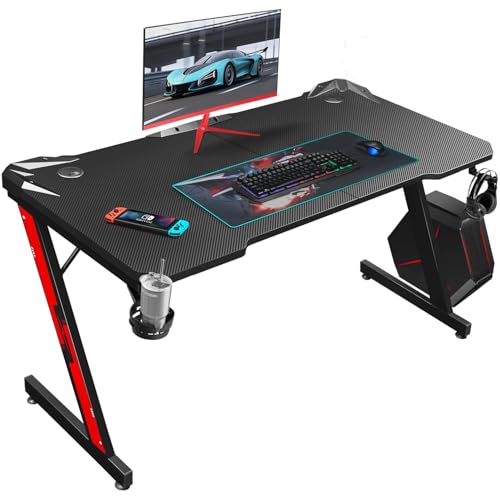
The Homall Gaming Desk in the 44 inch size is a straightforward Z-shaped gaming desk with a carbon fibre textured desktop, a steel frame, a cup holder, and a headphone hook. Its cable management feature is a cord collector under the desk, which gathers the cables from the monitor, keyboard, and headset into one channel instead of letting them hang loose behind the legs. The manual for this model also describes cable holes that help route wires from the desktop into the collector, keeping the run tidy from the surface down.
The Z-shaped frame gives the desk a stable base for its size, and adjustable leg pads help it sit level on uneven floors. The 44 inch width fits a single monitor, a full-size keyboard, and a mouse pad with room to spare, while the compact depth suits bedrooms and small home offices where a larger desk would block a doorway or a wardrobe.
Who it suits: first-time gaming desk buyers, students, and anyone furnishing a small room on a modest footprint. Who should skip it: players with dual monitors, a separate streaming PC, or a large speaker set, since the surface will fill up quickly and the cord collector will reach its limit sooner.
HUANUO Dual Motor L-Shaped Standing Gaming Desk (B0D2XP4PDS)
The HUANUO Dual Motor L-Shaped Standing Gaming Desk is the standing option in this guide, and its cable management is designed around movement. A cable management tray attaches underneath the desktop to store a surge protector and organise cables, and because the tray is fixed to the moving frame, the cables rise and fall with the desk instead of pulling tight at standing height. Storage hooks on each side give headphones and bags a place off the desktop.
The L-shaped surface measures 71 by 48 inches, which leaves room for multiple monitors, a laptop, and a console on the return. Height adjusts from 28.3 inches to 47.2 inches with three memory presets, powered by dual motors, so two or more people sharing the desk can return to their own height with one press.
Who it suits: corner setups and shared desks where at least one person wants to stand during long sessions, and multi-monitor users who need a tray that moves with the desktop. Who should skip it: anyone who never changes desk height, since a fixed desk with the same tray costs less and assembles faster, and anyone whose room cannot fit an L-shaped footprint.
SEDETA L Shaped Gaming Desk 96 Inch (B0CFZZCNC3)
The SEDETA L Shaped Gaming Desk is the largest desk in this guide, and it treats cable management as part of a wider workstation system. The included components list a cable management tray alongside a monitor arm, a keyboard tray, and a power outlet unit. The desk converts between an L-shaped corner desk and a long double desk, so two people can sit side by side, and the 96 inch length gives each side room for a monitor without the cables crossing in the middle.
Built-in power is a genuine help here: four AC outlets and two USB ports in the desktop let phones, tablets, and controllers charge without running a separate cable back to a wall socket. The keyboard tray slides out of the way when not in use, which keeps the main surface clear for routing monitor and speaker cables in straight lines. A pegboard and three-tier storage hold accessories that would otherwise pile up on the desktop and block the cable routes.
Who it suits: two-person setups, streamers with a second PC or a capture setup, and anyone who wants a desk that can change shape when the room changes. Who should skip it: single-monitor players in small rooms, since the desk needs a large wall run or a corner to fit, and the extra storage becomes clutter rather than help when the setup is small.
EUREKA ERGONOMIC GTG L60 Gaming Desk (B09X3JTW9B)
The EUREKA ERGONOMIC GTG L60 is a 60 inch L-shaped gaming desk with a black glass desktop and RGB LED lighting. Its cable management includes a cable management tray and cable ties, plus a power strip holder, so the surge protector has a dedicated home instead of sharing space with loose cables. A cup holder and a headphone hook keep two of the most common desktop items off the surface, which leaves the routing paths clear.
The L shape suits a curved monitor or a dual-monitor corner setup, with the return giving space for a console or a second screen. The glass surface wipes clean easily and gives the desk a distinct look, but it also means the tray has to do its job well, since cables under glass are more visible than cables under a solid desktop.
Who it suits: players who want an L-shaped glass desk with lighting and a dedicated power strip holder, and corner setups where the return holds a console or a second monitor. Who should skip it: anyone who prefers a solid desktop that hides cables from above, or who wants a desk without lighting features.
What to Check Before You Buy
Measure the space first, including the depth the chair needs to pull out and the clearance for a PC tower on the floor beside the desk. A desk that fits the wall but leaves no room to reach behind it will make cable routing a chore every time a cable is added or swapped. Check the tray against the actual surge protector, including its length and the depth of its plugs, since a strip that is longer than the tray will overhang and pull cables out of line.
Think about where the wall sockets are. A desk with built-in outlets still needs one cable back to the wall, and that cable should reach without crossing a walkway. A desk placed with its back to the room needs a tray that hides cables from the front as well as the back, since visitors will see the rear of the setup.
FAQ
What is the best cable management feature on a gaming desk?
A full-length under-desk tray that holds a surge protector flat is the most useful single feature, because it removes the bulkiest item from the floor and gives every other cable a place to end. Grommets and cutouts come second, since they provide the short paths from the desktop into the tray. A desk with both features will stay tidy longer than a desk with only one of them.
Do gaming desks with cable trays work with standing desks?
Yes, provided the tray is fixed to the moving desktop frame rather than to the floor or to a fixed leg. On a standing desk, a tray that moves with the desktop keeps cable lengths constant as the height changes. Leave a little slack in each cable so the highest position does not pull a plug out of a monitor or a PC.
How many monitors fit on a gaming desk with good cable management?
A desk around 44 inches wide suits one monitor comfortably, while a desk of 55 to 60 inches suits two monitors with speakers. An L-shaped desk adds a return surface for a third screen or a console without widening the main run. The cable tray should span enough of the width to serve every monitor, since a monitor whose cables cannot reach the tray will end up routed around the side of the desk instead.
Is a glass gaming desk harder to keep tidy?
A glass desktop shows cables underneath more clearly than a solid desktop, so the tray and routing matter more, not less. Choose a desk with a tray that sits close under the desktop and a power strip holder that keeps the strip flat, and route cables in straight bundles rather than loose loops.
Can I add cable management to a gaming desk that has none?
A clamp-on under-desk tray, a set of grommets fitted into drilled holes, and adhesive cable clips can add basic routing to a plain desk. That approach works for a small setup, but it rarely matches a desk with a tray designed into the frame, because add-on trays are often narrower and sit lower.
Bottom Line
The best gaming desks for cable management are the ones that give cables a complete route, from a routing hole on the desktop, down into a tray that holds a surge protector, and out to the wall without crossing the floor. The Atlantic Original Gaming Desk is the strongest compact choice for a single-monitor setup with lots of accessories, while the Homall 44 Inch desk suits small rooms and first setups. The HUANUO standing desk is the pick for corner setups where height changes during the day, the SEDETA 96 Inch desk suits two-person and dual-system stations, and the EUREKA ERGONOMIC GTG L60 suits players who want an L-shaped glass desk with a dedicated power strip holder. Measure the space, count the cables, and choose the desk whose tray is wide enough for the surge protector that will actually live in it.
Disclosure: As an Amazon Associate, we may earn from qualifying purchases.